Wednesday, March 03, 2021

My Code Needed a Comment to Compile

 When I was learning python, I added a utf-8 string literal to the source code as follows:

# replace invalid ’ character with '
inputFileContents = inputFileContents.replace('’', "'")

Which caused this error:

SyntaxError: Non-ASCII character '\xe2' in file gcnlsync.py on line 85, but no encoding declared; see http://python.org/dev/peps/pep-0263/ for details

My python code would not run until I added a comment to the file that declared utf-8 encoding. This is literally the top 2 lines of my file:

#!/usr/bin/python
# This Python file uses the following encoding: utf-8

After adding the comment, it ran perfectly! 😳

Monday, November 28, 2016

Raspberry Pi Apartment Hunter

Many apartment complexes use sophisticated algorithms to change lease prices on a daily basis. If they can use an algorithm to maximize value, I can too!

In this post, I will walk through the steps I took to grab data from an apartment leasing website, monitor changes, and send me email alerts.


Grabbing the Data

In this example we will take a dive into a Leasing Website in Glendale

A click on "Apartments + Pricing" will reveal a page that looks like this:

The web page is retrieving the apartment data from a remote server. Let's see if we can find it.

Using the Google Chrome web browser, select "View -> Developer -> Developer Tools", and refresh the web page.


In our Developer Console, we see dozens of javascript executions and connections to remote urls. One of the urls is called "ApartmentSearch". It contains all the beautiful apartment data we want. 


Copy/paste the url into a new browser tab, and you'll find a handy, if messy, wall of JSON text.


Copy all the text. Let's visit jsonlint.com and pretty it up:


Fantastic! Scrolling through this data, we can find every apartment and its current lease price.


Monitoring Data with a Raspberry Pi

The website gives us a JSON object, which is very easy to read and manipulate in JavaScript. I wrote a server-side JavaScript script, "apartment.js", that parses the JSON data, and writes to a CSV file. Later, we use the CSV file to make pretty graphs in Microsoft Excel.

Here is a screenshot of the code parsing the JSON object:


When the data is saved to a CSV file, it looks like this:


I used a Raspberry Pi computer to run my "apartment.js" script every 6 hours. Each time the script ran, it would parse the JSON object, and add the current apartment prices to the CSV file. Server-side Javascript is possible thanks to the NodeJS project.  Raspberry Pi is an inexpensive computer that is popular for open-source projects. What I like most about a Raspberry Pi is that I can leave it on all the time without worrying about an expensive energy bill.

Running a script every 6 hours with crontab

Here I log into my Raspberry Pi and execute "crontab -e". This can be done on any Unix-like machine such as Mac OS or Linux

Inside cron, the bottom line runs the "apartment.js" script every 6 hours.


Pretty Graphs

What did we learn?


Between September 13th and October 7th, apartment 106 bounced around in price. Eventually, it slid to a sweet $2150 before being sold. Whoever claimed it got a great deal.


Between September 13th and October 16th, apartment 109 slid to an even cheaper price at $2070. However, after 106 sold, it quickly shot up in price and stubbornly stayed there. 109 was sold on October 16th for $2200. Whoever bought it missed the optimal deal.


Apartment 117 appeared on November 4th, and quickly shot up in price. It's been more than 20 days and no one has bought it...

Later, I will share more graphs if I discover any interesting trends.


Email Alerts

As the Raspberry Pi collected data, I had it send me emails when something interesting happened:
  1. When any apartment reached its cheapest price ever
  2. When any apartment became vacant or sold
This way, I didn't need to refresh the leasing website like a crazy person. 

Side note:
I implemented this algorithm for myself, so I took the lazy route and stored data in a text file for a single user. For a more scalable solution, I would recommend a MongoDB database. I chose to skip installing MongoDB at the time because the official MongoDB binaries did not support my Raspberry Pi.

Cheapest Price Ever


Prices dropped in September and October as vacancies opened up:


Eventually, a one-bedroom apartment bottomed out at $2070


Vacancies were sold and prices have climbed ever since.

Apartment Vacancy Changes

Starting on October 16th, I programmed the Pi to email me about vacancy changes


My email archives tell me a lot about how often vacancies were added or sold:


Notice that vacancies changed every 5-10 days until the middle of November. Since then, vacancies haven't changed for more than 20 days.


New apartments usually would popup with with much-higher-than-average prices. 😅

Source Code

I uploaded the source code onto GitHub!


Conclusion

My Apartment Hunting algorithm confirmed the obvious. When lots of apartments are vacant for a long time, their prices slowly drop until they are sold. After one sells, the remaining apartments spike in price for a while.

The email alerts were certainly handy. I didn't need to worry about refreshing the web page every day for the best deal. With my Raspberry Pi collecting data directly, the apartment company could not track any web browsing data about me. That in itself was its own reward.


Monday, August 22, 2016

Video Game Prototyping

Video Game Prototyping is an emotional roller coaster. Two months ago, I started hammering at a totally amazing game idea. Every day was a coding frenzy. I couldn’t wait to get the game in people’s hands.
After a week, the first playable was ready. Players were excited by the gameplay, but wildly confused by the touch screen controls. I took a step back, and simplified the game controls from 8 buttons to 3 buttons. As a result, the game lost some of its strategic depth.
Another playtest took place. Players found the game easier to play, but also less interesting. Feeling humbled, but not discouraged, I set out to find the new fun factor the game needed. I spent days churning out one game mechanic after another. I felt completely in my element, putting all of my skills to the test.
As the days went by, none of the mechanics stuck. I felt this sinking feeling that maybe I can’t figure this one out. Each day became more difficult, each mechanic less fun, and after 8 days I ran out of ideas. My confidence hit an all-time low. Why was I even wasting my time on this?
The next day, an innocent thought popped into my head. The Bullet mechanic was fun, but lacked strategy. The Bomb mechanic was strategic, but too slow. What if… the bullets were also bombs? And a skillful player can strategically detonate them?
My confidence started climbing. This tiny layer of strategy enhanced every aspect of the game. Play time jumped from 2 minutes to 10 minutes. Laughing and trash talk ensued. The game was back on track, and even better than before.
This is an ongoing project. My mind is buzzing with ideas. Hopefully I can share it with you all soon!

Sunday, July 19, 2015

Unity: Rotate a 3D ball using 2D Physics

Unity is an awesome game engine with great 2D and 3D features. While working on a 2D game world with 3D game art, I ran into an unexpected challenge with rolling 3D spheres. Let's frame the problem in the context of a 2D soccer game with a top-down view.


TL;DR
Before (animated gif)
After (animated gif)
GitHub Project

Saturday, August 09, 2014

Crypt of the Necrodancer: Dance Pad Setup Tutorial


Crypt of the Necrodancer is an amazing game. I love the rythm-driven mechanics, and how it lends itself to play on a Dance Pad. While my reflexes are best with the keyboard Arrow Keys, I bought the Deluxe D-Force Dance Pad for a bit of exercise, and novelty at parties.

Sunday, December 04, 2011

Rapid Physics Beta Release


Rapid Physics is a custom Physics Engine that I decided to build in Flash.

Why would I torture myself like that?

There are plenty of industrial-strength physics engines out there, such as Havok and Box2D. They offer complete and robust physics simulations, but they also hide a lot of information from the programmers that use them. This leads to two problems:
  1. Hard limits on authorship control over the physics simulation (lots of code you didn't write)
  2. A sense of helplessness when debugging engine-level problems (lots of code you didn't test)
Effectively, game programmers lose the granularity to control subtle features of the physics simulation, and the ability to do custom collision resolution for gameplay purposes. For games whose physics are integral to gameplay, there is still a place for custom physics implementations.

I designed Rapid Physics to tackle one specific problem that most general-purpose physics engines never attempt to address: Tunneling


Tuesday, September 20, 2011

Rapid Physics

I am building a physics engine called Rapid Physics. It is designed to correctly simulate objects that move really fast. This is difficult problem that is commonly known as the tunneling problem.


Check out a quick demo here:
Rapid Physics 0.25 Alpha


Tuesday, June 14, 2011

E3 2011


A few weeks ago, I received an amazing phone call that would change my life (for a week).

I became an IGDA E3 Scholar!

What's that you ask?

Let's break it down. First, the IGDA is an official support group for game developers. Here is their official About statement from IGDA.org:
The International Game Developers Association is the largest non-profit membership organization serving individuals who create video games. We bring together developers at conferences, in local chapters and in special interest groups to improve their lives and craft.
The Electronic Entertainment Expo, or E3, is the largest media gathering in the Videogame Industry. Every major game studio and platform holder uses E3 as a venue to announce their next big thing.

As an IGDA E3 Scholar, I got a pretty sweet deal:

  • Pre-paid E3 ticket ($500 value)
  • Access to the press events from Sony, Microsoft, Nintendo, EA, and Ubisoft.
  • Tours of several game studio booths on the show floor
  • A couple lunches with various game developers
  • Some 2nd floor access
  • A field trip to the CAA, and EALA
  • Doing all of the above in the company of 14 other IGDA E3 Scholars. 
It was the most epic E3 a person could ever hope for. I am extremely grateful to the IGDA for this incredible opportunity to network and learn from my peers. Below, in no particular order, are some of my most vivid memories from the event:

During a developers lunch, I spoke with an EA programmer about game engine architectures. My specific interest was what comes first in a professional GameObject class hierarchy: rendering or physics? To illustrate my question more clearly, would the class inheritance hierarchy look like this:
  • GameObject
  • RenderingObject
  • PhysicsObject
Or this?
  • GameObject
  • PhysicsObject
  • RenderingObject
The professional convention seems to be one of two things: they either both occur at the same level, or an object-compositional model is used, where a RenderingObject owns a PhysicsObject. The latter model is especially useful in games where a 3rd-party physics engine like Havok is employed.

Microsoft made a bunch of Kinect-related announcements during their E3 press conference, one of which was the use of Voice Commands in Mass Effect 3. I was giggling to myself as this was presented, as I had already beaten Bioware to the punch with my Voice Command game, The Bridge. We wrapped up that project last month. :D

For the record, the experience of physically speaking Voice Commands to a game character, and then having that character respond appropriately, feels really amazing. It will be a killer addition to the Mass Effect 3 experience that everyone should try at least once.

Tim Schaffer is hilarious.

Sony had a good press conference. The Playstation-branded 3DTV for $500 looked really damn nice. 

I managed to show my Bullet Time Ninja game in video form to quite a few game developers on the show floor. Reactions ranged from "pretty neat" to "omg that's really awesome!!", so I'm pleased as punch. :)

A few quick blurbs on games that I played:
  • Fruit Ninja for Kinect is everything that I have ever wanted from a Kinect game.
  • Skulls of the Shogan looks like a good Indie game. There are a few game design kinks, but I am optimistic that they will be addressed before release.
  • SkullGirls has the greatest art and animation that I have ever seen in a fighting game. Must buy!
  • Monaco is really fun, but I feel like the current pixel art is holding the game back. I had a difficult time initially learning what was important on screen. Some focused art direction will turn that game from Great to Incredible.
  • I was outright impressed by the new XCOM game. The art style is right on the mark.
  • Kirby Wii is the most fun Kirby game I that have ever played.
  • The Wii U demos were pretty neat. I have high hopes.

Videogames Live had a great show this year. The Chrono Trigger performance was beautifully done. Have a listen: http://www.youtube.com/watch?v=UV2RKqmCs4w

Overall, this was the greatest E3 experience I have ever had. The IGDA is doing a great service for up and coming students. I hope future generations of amazing game designers get the same opportunities.

Thanks for reading,
Greg


Wednesday, June 01, 2011

Empires & Allies


I started my internship at Zynga Los Angeles last week. We are working on a cool game called Empires & Allies. I think it's the best Zynga game yet.

While most Zynga games have you building some kind of farm or city, in Empires & Allies you are building an army. Make buildings, produce units, and take them battle. There's a pretty lengthy single-player campaign, and you can also invade your neighbors and take their resources.

The most interesting part of this game is the incredible sophistication of it's economy. I have never seen a game with a remotely comparable amount of interlocked systems. Let's list out every resource there is:

  • Coins
  • Empire Points
  • XP
  • Energy
  • Wood
  • Oil
  • Liberty Bonds
  • Ore Types
    • Aluminum
    • Uranium
    • Iron
    • Gold
    • Copper 
  • Population
  • Neighbors
  • Units
  • Time - (a component to everything)

We've seen a lot of these resources in previous Zynga games. Let's talk about the new ones.
  • Wood: A resource limiter on how quickly you can make buildings. Simple enough, and quite clever.
  • Oil: A resource limiter on how quickly you can make military Units.
  • Ore types: The player is randomly given one kind of Ore type that can be produced within his or her empire. Players must trade with their neighbors to get other types of Ore. Ore is mostly required to produce certain kinds of units and buildings.
  • Units: The most significant new resource. Units you make can be taken to battle. When units die, they are permanently gone, and new ones must be produced.

The problem I have with many Zynga games is that after playing them for a few days, I amass so many buildings and resources, that I stop caring about my resources altogether. This is why I find Units in Empires & Allies so fascinating. A Unit is a resource that I can lose. The more I play the game, the more I burn Units in combat. In response, I deposit my hard-earned Coins, Oil, and Ore to replace them. It's a great cycle that will keep me running a tight economy for the lifetime of my gameplay sessions. Plus, units exist in several tiers. As I unlock new ones, I always have something to build.

Empires & Allies looks to be a fantastic addition to the Zynga portfolio. I am thrilled to be working on it.


Monday, May 09, 2011

The Bridge Wrap-Up


Work has wrapped up on The Bridge. Big thanks to the team and everyone who supported us.

Here's our awesome website:
http://commandthebridge.com/

Here's a live demonstration of the final game:
http://www.youtube.com/watch?v=uW5x6AyL7Cw

We were featured on ABC 7 News:
http://abclocal.go.com/kabc/video?id=8113138

We were also featured at TEDxUSC:
http://www.facebook.com/media/set/?set=a.10150217517612037.355868.509387036&l=9a2c67f60c


What an awesomely fun project.

Wednesday, January 26, 2011

Demo Day

Each semester, USC hosts a Demo Day where Computer Science Games students present their game projects to professionals in the industry. In December 2010, I presented The Bridge on behalf of my team. The media coverage has just been released, which you can check out here:

http://viterbi.usc.edu/news/news/2010/gamepipe-lab-hosts.htm


The picture of me in the article is nothing short of ridiculous. :P

Monday, January 24, 2011

Microsoft Word Makes Me Sad


I have a love/hate relationship with Microsoft Word. I trust it to get my work done securely and professionally, but my day-to-day experience with the product is often plain frustrating.
Take for example, this outline I began putting together in Microsoft Word 2008 for Mac


I have pasted a URL, and want to make it a hyperlink. How can I do that?


Ah yes, there it is, in this huge menu. Let's select the Hyperlink option.


Whoa, a huge popup with tons of information I don't want to read. Let's press ok and see if it works...


It looks like the URL became a hyperlink, but it also screwed up my bullet point formatting.

:(
 

Monday, December 13, 2010

Vector Math

I ran into a fun  problem while working on The Bridge today:


In my process of refactoring the ship engine, I added a rotational thruster to turn the ship. When the player issues a Turn Clockwise command, the Navigator AI will apply the rotational thruster to the ship until it reaches the desired velocity.

Here are the properties I worked with:
  • A target yaw, pitch, and roll to rotate to, in terms of angular velocity
  • Current angular velocity of the ship
  • Angular acceleration of the ship's engines

Each of these I represented as a Vector3 in XNA
  • Vector3 targetAngularVelocity;
  • Vector3 currentAngularVelocity;
  • ship.engines.angularThrust

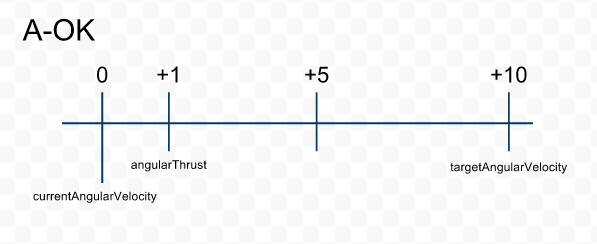
I figured that the most logical way to approach this was to adjust angularThrust every frame in an Update loop. The challenge was figuring out what acceleration was appropriate, when only given currentAngularVelocity and targetAngularVelocity.

My first attempt involved finding a midpoint vector with a simple LERP:
ship.engines.angularThrust = Vector3.Lerp(currentAngularVelocity, targetAngularVelocity, strength) * time;
This works when going from not rotating at all, to rotating in some direction. However, it fails miserably if the ship is already moving in some capacity. I ended up spinning the player's ship phenomenally fast.


Clearly, a midpoint isn't good enough, I need something a bit more relative.

Thankfully, a simple Vector Math trick works nicely:
ship.engines.angularThrust = (targetAngularVelocity - currentAngularVelocity) * strength * time;
Subtracting targetAngularVelocity from currentAngularVelocity will give me a new Vector that points from currentAngularVelocity  to targetAngularVelocity . Then all I need to do is shrink the strength of the vector down to a reasonable acceleration, and I'm done.


And thanks to the miracles of Vector Math, this will work in any direction, under any circumstance. 


Sunday, November 07, 2010

Typical Day

I have a daily habit of scanning through kotaku.com and gizmodo.com. As I read through article headlines, I open the articles in new tabs for later reading. Here's a sample of what that looks like:


I find it a good way to keep up to speed with current trends in the game and gadget industries, and also find lots of cool pictures.

Sometimes I will watch a video as I read through web articles. Generally I'll watch at a TED conference or two since I find them pretty enriching. The window resizing features in Windows 7 are particularly useful here:


Have a favorite news website to procrastinate on? Leave a comment below.

Wednesday, October 27, 2010

The Bridge

This semester, I am the Technical Lead of a super-cool Science Fiction game called The Bridge.


In the game, you command starship entirely with voice control.

Here are some of the innovate things the game has going for it:

  • Speech Recognition as a seamless part of gameplay
    • The player can say things like:
      • "Weapons, fire missiles at enemy ship alpha"
      • "Navigator, engage defense orbit"
  • Dynamic Story Engine
    • Every actor in the game is an Entity
    • Entities have Relationships with other Entities
    • Relationships evolve throughout gameplay
    • Result: fully procedural storytelling
  • Emotional Voice Recognition
    • The player's tone is interpreted by the game
    • This affects crew loyalty towards the player


Of course, that's only the beginning.


For more information, check out the game's website:
commandthebridge.com


- Greg

Friday, September 17, 2010

Flash Sound Tutorial

I made a tutorial for using Sound Objects in Flash.


The tutorial covers a few tricks I use, including:
  • Object Dictionaries
  • Creating Asset Instances in the Flash IDE
  • Importing Sound Assets
  • Creating Sound Objects in ActionScript
  • Using Sound Objects
    • Play, Stop, and Change Volume
You can download the tutorial here:

The tutorial includes a Complete copy of the code, and a Skeleton copy for you to practice writing yourself. You will need Flash CS4 or later.


Surprisingly, creating a robust Sound Engine only requires about 60 lines of code.

Hope it's useful,
- Greg

Thursday, July 08, 2010

AStar Game

Recently, I learned how to implement the super-awesome pathfinding algorithm called A*. Given a start point and a goal, A* will find the shortest possible path to the goal while evaluating as few paths as necessary.

Not satisfied with leaving such a juicy algorithm to rot in a classroom, I set out to build a game.


I chose to create a Cat and Mouse game where the player tries to reach a goal while running away from evil baddies. Sound familiar? Well I've made it before:


Warp Chase was the first videogame I ever made. And by "made", I mean copy-pasted from a game programming book and added some levels. Oh shame. At the time, I did my best to add some personal spirit to the title, but didn't know enough concepts to program any of the gameplay that I had imagined.

Lucky for me, this kind of game lends itself perfectly to A*, since baddies need to be pretty movement-efficient to chase the player effectively. I set forth to fully realize the gameplay I couldn't quite grasp before.


Implementing A* was an interesting exercise in itself. I spent a few days experimenting and optimizing my implementation. Ultimately, I cut my processing time for a long A* search from 117 milliseconds to under 4. The biggest gains came from two places: First, I evaluated visited nodes by looking up values in a 2D array, rather than wastefully looking through each nodes list of visited previous nodes. Second, I implemented my own priority queue using a heap, which saved a lot of time on sorting.


From a gameplay standpoint,  the escape mechanic was fun for a while, but I quickly grew bored of it. A* was just too intelligent to waste on such shallow gameplay.

I wanted strategy.

While finishing the implementation for the Escape part of the game, I stumbled upon a very interesting bug. Effectively, the bug allowed the player to create walls that could trap unsuspecting baddies. Very interesting indeed.


A few experiments and 9 levels later, I found that the trap mechanic allowed me to make some modestly interesting puzzles. I won't spoil the levels here though. Go play the game!

http://kwarp.com/portfolio/astargame.html


Sunday, March 21, 2010

Computer Graphics

Here's some cool Computer Graphics projects I've worked on this semester:


In this assignment I wrote a variant of the Midpoint Algorithm to draw lines. You can also toggle attributes such as color, anti-aliasing, and line weight.


Here's a cool Wireframe renderer. I wrote Matricies that handle all the transforms from Object Space to Screen Space, and everything in between. I threw in my animated robot dude for good fun, and a slider that moves between a pure perspective and orthographic projection. With a perspective projection, objects farther away seem smaller and converge at a vanishing point. On the other hand, orthographic projection has no vanishing point at all.

I wrote the programs using a Java-based work environment called Processing. It's very easy to get started making cool stuff. Check it out.